

Imagine you find an image online that you love, but you have no idea where it came from, who owns it, or if it been used elsewhere.
That is where TinEye comes in. TinEye is a reverse image search engine that lets you find where an image appears on the web, trace its origins, and even locate higher-resolution versions of it.
No matter if you are a blogger needing to verify photo sources, a photographer protecting your work, or just curious about where an image came from, TinEye is one of the simplest tools to use.
In our blog post, you learn what it does, how it works, how to use it, and how it compares to other image search tools.
Table of Contents
What Is Reverse Image Search?
What is reverse image search?
Most search engines work by matching text keywords. But reverse image search works by matching visual data, the pixels in an image, to other images on the internet.
It means you don’t need to know any keywords to search; you need the image itself.
TinEye was one of the first tools to offer this technology.
How TinEye Works Behind the Scenes
TinEye does not use keywords or metadata. Instead, it analyzes the visual content of your image to create a unique digital fingerprint. It then scans billions of images in its index to find matches.
Unlike tools that rely on text descriptions or attached tags, TinEye sees a photo more like a human would, focusing on visual patterns and similarities.
How to Use TinEye (Step-by-Step)
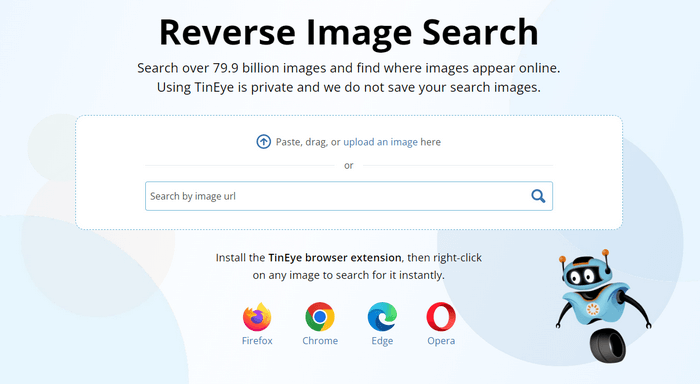
TinEye makes reverse image searching really easy. Here is how to get started:
1. Go to TinEye.com, and you’ll see a simple search box where you can upload an image or paste an image URL.
2. You have several ways to start a search:
- Upload an image file.
- Paste a URL that links to an online image.
- Drag and drop it right onto the page.
All of these options accomplish the same thing: TinEye creates a fingerprint of the image and searches for matches.
3. TinEye will show thumbnails of all found matches, along with details about where they appear online.

Here is what you can find out from the results:
- Websites where the image appears.
- Whether the image has been edited or cropped.
- Earliest versions found.
- Links to larger or higher-resolution versions.
Sorting and Filtering Your Search
TinEye does not just find matches, it lets you sort and filter results to focus your search:
- Best Match: Closest visual match to your original image.
- Most Changed: Shows heavily edited versions first.
- Biggest Image: Start with the largest versions.
- Newest/Oldest: Organize by date the matches were discovered on the web.
This can save you time, especially if you’re searching for a very specific version of an image.
Browser Extensions: Search Faster
If you do reverse image search often, you don’t always have to visit the website directly.
TinEye offers browser extensions for Chrome, Firefox, Edge, and Opera. With these installed, you can right-click any image online and search it instantly.
This feature is super useful for researchers, bloggers, and pros who want a quick way to track images on the fly.
TinEye API: For Professionals and Businesses
TinEye is not just for casual users. If you work with images regularly, for example, in publishing, marketing, or development, you can use the TinEye API to automate image searches.
With the API, you can integrate reverse image search into your own tools, apps, and workflows, perfect for media companies tracking image usage.
E-commerce sites that monitor unauthorized product photos and brand teams checking for unlicensed use of logos
The API is not free, but it is powerful and flexible if you need automated image scanning.
Why Use TinEye? Top Benefits
Protect Your Copyright – If you are a photographer or creator, you can check where your images are being used online, good for tracking misuse.
Find the Original Source – TinEye can help you trace the first known occurrence of an image on the web.
Discover Higher-Resolution Images – Got a blurry photo? You might find a clearer version online.
Easy to Use and Privacy-Focused – TinEye does not save your uploads; your search image is not added to the database.
Browser Tools for Fast Searches – Right-click search options make it very convenient.
Limitations: What TinEye Can Not Do
No tool is perfect, and TinEye has some limitations to be aware of:
Smaller Index Compared to Google – TinEye’s database is not as massive as some other big search engines, meaning you might find fewer results.
No Object Recognition – Unlike Google Lens, TinEye is not designed to identify objects inside the image; it finds exact or visually similar matches only.
No Mobile App – There is no dedicated mobile app yet, only a mobile-friendly website.
These are important to know so you can choose the right tool for your specific needs.
Final Thoughts
TinEye stands out as one of the best reverse image search tools because it focuses on accuracy, privacy, and finding exact image matches rather than relying on keywords or guesswork.
Its ability to track image usage across the web, uncover sources, and identify modified versions makes it especially valuable for creators, researchers, and anyone who wants reliable, no-nonsense results.
While it is not perfect, and other tools may offer broader or more advanced search features, TinEye remains one of the best places to start when you want to find where an image appears online and trace its way across the web.
If you have not tried it yet, head over to TinEye.com and search for an image; you might be surprised by what you find

Editorial Staff at WP Daily Coupons is a team of WordPress experts led by Peter Nilsson.